- Install the following free software
- K-lite codec pack,
- Virtual Dub
- VobSub
- Project-X
- TSRemux
- mkvtoolnix
- AviSynth
- ffmpeg (WinFF)
- Son2VSub
- Assume the video files are recorded and are in
- D:\temp\~DATA\DATA00.trp
- D:\temp\~DATA\DATA01.trp
- D:\temp\~DATA\DATA02.trp
- Join the 3 trp files into one.
- In START menu, Run, type cmd.
- Type the following:
- d:
- cd d:\temp\~DATA
- type DATA00.trp DATA01.trp DATA02.trp > final.trp
Microsoft Windows [? 6.0.6001]
Copyright (c) 2006 Microsoft Corporation. All rights reserved.
C:\Users\ylam>d:
D:\>d:
D:\>cd d:\temp
d:\temp>cd ~DATA
d:\temp\~DATA>type DATA00.trp DATA01.trp DATA02.trp > final.trp
DATA00.trp
DATA01.trp
DATA02.trp
d:\temp\~DATA>
- Extract subtitle information:
- Open Project-X http://sourceforge.net/projects/project-x
- In menu Presettings -> subtitle tab:
- Simulate DVB subpictures IRD color model, choose NRX
- tick "additional export as VobSub (idx+sub)


- Choose to export only subtitle

- Add final.trp, choose Quick start

- You should be able to see many files generated.
Keep only final.sup.sub, final.sub.idx and remove other files generated
- Use TSRemux to convert the final.trp to final.ts.
Choose only 1 video and 1 audio stream.
Note: for audio stream, the one with smaller number is the original language.

- Adjust the subtitle color:
- Open the program SubResync in VobSub.
- Drag final.sup.idx into SubResync.
- Quickly browse the subtitle, you will find some of them are not very clear:

To fix this problem:- Save the subtitle in DVDMaestro format in a separate directory, say "son".
- In son\final.sup.son, modify it from:
toDirectory .
Subtitle final.sup
Display_Area (0 2 719 575)
Contrast (15 15 15 0)
SP_NUMBER START END FILE_NAME
Color (1 14 0 15)
Contrast (15 15 0 15)
0001 00:01:00:20 00:01:02:13 final.sup_0001.bmp
Color (1 2 0 8)
Contrast (11 15 0 15)
0002 00:01:09:11 00:01:13:23 final.sup_0002.bmp
Color (15 2 0 13)
Contrast (8 15 0 15)
0003 00:01:14:01 00:01:17:11 final.sup_0003.bmpSubtitle final.sup
Display_Area (0 2 719 575)
Contrast (15 15 0 15)
Color (1 2 0 3)SP_NUMBER START END FILE_NAME
0001 00:02:44:13 00:02:46:06 final.sup_0001.bmp
0002 00:02:46:10 00:02:49:03 final.sup_0002.bmp
0003 00:02:59:21 00:03:01:05 final.sup_0003.bmp
Note that color with index 0 is a transparent color.
- Start the Son2VSub program.
Open the son\final.sup.son directory.
Change the output from 720x480 to 720x576

- In the output file son\final.idx file, change from
# The original palette of the DVD in PGC#1
palette: 000060, 2b2b2b, 2c2c2c, 353535, 535353, 414141, 626262, 7c7c7c, a9a9a9, c8c8c8, 8f8f8f, ebebeb, b8b8b8, dbdbdb, 9c9c9c, 2b2b2b
to
# The original palette of the DVD in PGC#1
palette: 000000, 000000, 000000, ffffff, 535353, 414141, 626262, 7c7c7c, a9a9a9, c8c8c8, 8f8f8f, ebebeb, b8b8b8, dbdbdb, 9c9c9c, 2b2b2b
The subtitle now looks better:

- Adjust the subtitle time:
- Find the first subtitle in final.sup.idx
- Play D:\temp\~DATA\final.ts in Media Player Classic (in K-lite Codec pack).
Play until the first subtitle is heard. Write down the time of the first subtitle. - In SubResync, right click the subtitle chosen 2 times, until seeing the red triangle
- Enter the correct time of the subtitle chosen. Save as final.idx

- Reopen final.ts in Media Player Classic. The subtitle time should be correct now.
- Find the cropping details for movie, in Virtual Dub.
- In D:\temp\~DATA\, create a file called final.avs (using notepad) with the following content:
DirectShowSource("final.ts")
LoadPlugin("c:\Program Files\K-Lite Codec Pack\Filters\vsfilter.dll")
VobSub("final.idx")
- Drag "final.avs" into Virtual Dub.
- In Virtual Dub, "Video" Menu, choose "Filter".
- Add "Null Transformation"

- Choose "Cropping...".

- Determine the cropping details (i.e. Write down X1, X2, Y1, Y2. Note they must be even number):


- In D:\temp\~DATA\, create a file called final.avs (using notepad) with the following content:
- Using ffmpeg to convert final.ts to XVID encoded (MPEG4) AVI file final.avi:
- Start a command prompt.
- type the following:
- d:
- cd d:\temp\~DATA
- "C:\Program Files\WinFF\ffmpeg.exe" -i final.ts -vcodec xvid -vtag XVID -deinterlace -croptop 76 -cropbottom 76 -cropleft 4 -cropright 4 -s 640x360 -qmin 4 -qmax 4 -bufsize 4096 -mbd 2 -bf 2 -flags +4mv+trell -aic 2 -cmp 2 -subcmp 2 -g 300 -acodec mp3 -ar 44100 -ab 128k -ac 2 final.avi
- Note:
- replace the value for croptop, cropbottom, cropleft, cropright with the values found in Y1, Y2, X1 and X2 found in Step (8).
- for the best quality video, set qmin, qmax to 1. (the smaller value the better video quality)
- -g 300 means for every 300 fames (12seconds), there is a I frame. Set to a smaller value if you need to editing.
- the above example uses 44100kbps, 128kpbs 2-channels mp3 audio. you can modify as your wish
- Merge final.avi, final.idx into final.mkv
- Start mkvtoolnix\mmg.exe, add final.avi, final.idx. Press "Start muxing".
2009年2月6日 星期五
Howto convert TV recorded program (trp format) with subtitle to mkv format?


2009年1月29日 星期四
東梅古道 (香港奧運徑)
今天又行了東梅古道(東涌至梅窩)。
今天(年初三),天氣寒冷,於是又去行東梅古道。東梅古道的其中一節,即白芒到梅窩一段,被政府修成為了「香港奧運徑」。但絕少有網頁介紹怎樣由東涌去白芒,有的又語焉不詳,所以今天我來寫一下怎樣去:
- 沿着位於東涌地鐵站D出口對面的富東街一直走:

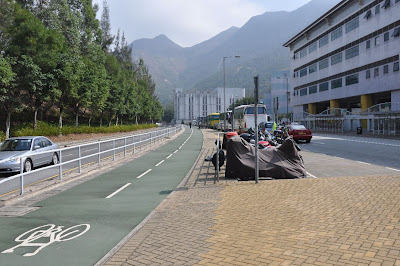


- 在單車徑的盡頭登上石級

- 後左轉。有兩條樓梯,記住選擇左手的樓梯

- 再從石級登上長長的水泥小徑,


- 一路沿着小徑向東北方向走,途經荒廢了的果園及跨越了數條的山澗。遇到這些難過的山澗,請不要放棄,繼續向前。


- 這一段路都可以看到在左邊的北大嶼山公路及機場的景色。
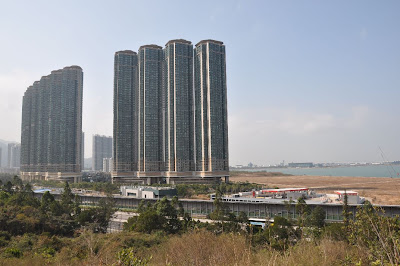

- 再走30分鐘後,便看到「奧運林」的牌。

- 走過了這一段由水泥路及山路相互交替的路段後,便沿着石級下降至海旁。
- 沿着位於石級右邊的水泥路向東南方向走,便到達了白芒。

- 奧運徑就此開始了。


2009年1月4日 星期日
元荃古道 (荃灣 -> 港安醫院 -> 石龍拱 -> 田夫仔 -> 清快塘村 -> 深井)
今天 (2008-01-04) 去行元荃古道。
元荃古道,估計是在古代,沒有交通工具,人們從荃灣走去元朗唯有行山,行得多就形成這古道了。
首先從荃灣地鐵坐 39M 去到荃威花園總站。然後沿路向港安醫院方向返回一小段。

在港安醫院對面有「元荃古道」路牌。

繼續行....

在樓梯的頂部,有去元朗 和川龍的指示。選擇去元朗 。

荃灣一帶....


正式進入元荃古道

看到汀九橋嘛?

往石龍拱途上


往石龍拱途上


看到青衣島的一角,青馬橋(遠) + 汀九橋(近)


到了石龍拱了!

下一站 田夫仔


頗為斜(但不是很斜)的山路


(有個地方很多人休息)
(終於來到永吉橋。此處四通八達,是很多山徑的交匯處,也是處大休的好地方)


(想罵那班行山人士,真離譜,阻礙人看路牌,掛的東西那麼重,破壞了路牌怎辦?)

我沒有按照上面路標的指示去田夫仔,而是按照另外
路牌沿馬路去田夫仔。沿馬路行一會,就到了下面的路口。


(田清橋)


田夫仔露營場!冇人!

下一站清快塘村!按照大欖涌水塘路牌先前進

按照清快塘村行 好多行山伯伯啊

繼續往清快塘村


到了清快塘村喇!有人燒牛屎 好臭.

清快塘村

下一站:深井


深井的大廈


深井


深井舊村

有個士多好多人買野食!!!

深井燒鵝,但冇人幫襯,難道是金融海嘯,還是天氣太冷?

深井大馬路(青山公路),下次從深井行可從這邊出發!

訂閱:
文章 (Atom)